
Edit receipt photos with AI. Upload any receipt image, describe what you want to change, and get an edited version in seconds.
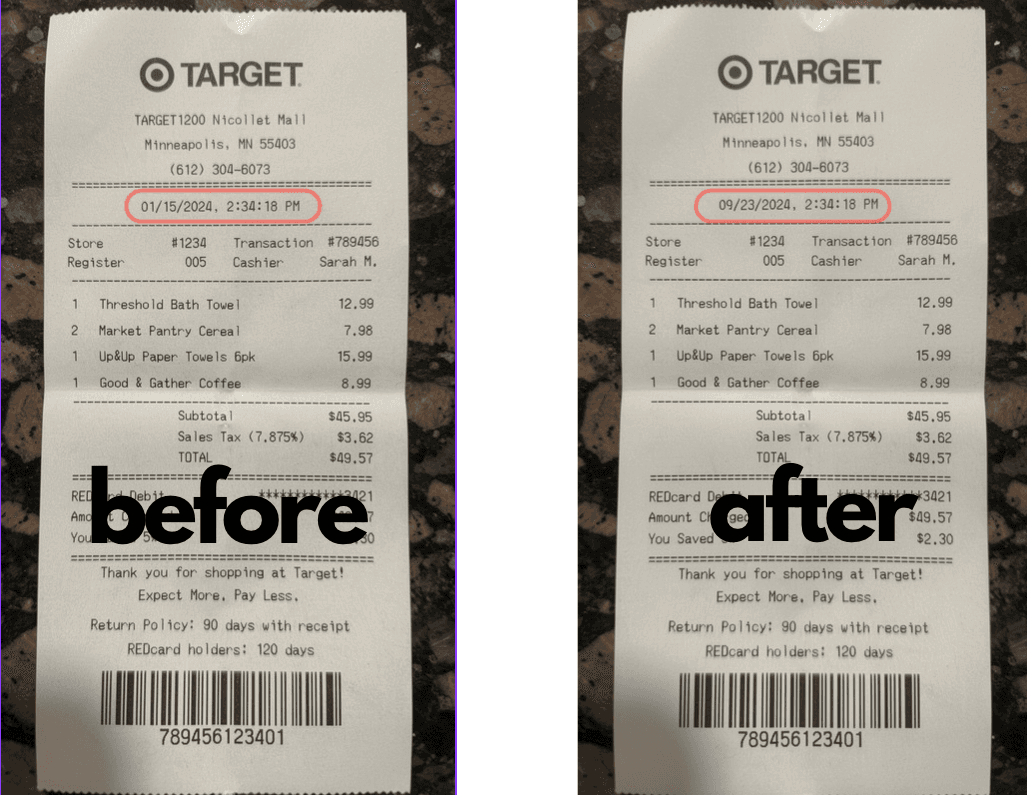
Example: changing the date on a Target receipt from January to September with a single prompt.
An AI receipt photo editor uses image generation models to modify existing receipt photographs. Unlike a receipt maker that builds receipts from scratch, the photo editor works with images you already have — real photos of receipts captured with your phone or scanner.
You upload a receipt photo, describe the change you want in plain English, and the AI modifies the image while preserving everything else. The result looks natural because the AI understands the original paper texture, lighting, font style, and layout.
1. Upload your receipt photo — Click the AI Image Editor tab above, then attach a photo of the receipt you want to edit. Supports JPEG, PNG, and WebP.
2. Describe the change — Tell the AI what you want to modify. Be specific about what should change:
3. Continue the conversation — The AI returns the edited image. Want another change? Just describe it — the AI uses the previous edit as the starting point, so you can make multiple changes in sequence.
4. Download — Click the download button on any edited image in the conversation to save it.
Dates and times — Change transaction dates, timestamps, and time zones on any receipt.
Amounts and totals — Modify item prices, subtotals, tax amounts, tips, and final totals.
Item names — Replace or rename line items while keeping the receipt layout intact.
Backgrounds — Swap the surface the receipt is photographed on — wood, marble, granite, or any surface you describe.
Store details — Update store names, addresses, phone numbers, and other header information.
Both tools use AI, but they solve different problems:
The AI receipt generator creates receipts from scratch. You describe what you need in text, and the AI builds a complete receipt with all the fields filled in. This is best when you don't have an existing receipt to work from.
The AI photo editor modifies an existing receipt image. You upload a photo and describe what to change. The AI preserves the original look — paper texture, font, layout, lighting — and only changes what you ask it to. This is best when you already have a receipt photo and need specific edits.
Upload a receipt photo. Describe the change. Download the result.